Features
- 🚀 High Performance: Concurrent scanning with configurable worker threads
- 📚 Two Wordlist Modes:
small - Standard TLDs (fast)large - TLD combinations (comprehensive)
- 💾 Smart Caching: Automatically stores wordlists in
~/.config/tldscan/ - 📊 Flexible Input: Support for both stdin piping and organization flags
- 🔍 Verbose Mode: Detailed output with IP resolution and setup information
- 💨 Silent Mode: Clean output for scripting and automation
Installation
Quick Install (Go)
1
| go install github.com/rix4uni/tldscan@latest
|
Prebuilt Binaries
1
2
3
4
5
6
| # Linux AMD64
wget https://github.com/rix4uni/tldscan/releases/download/v0.0.3/tldscan-linux-amd64-0.0.3.tgz
tar -xvzf tldscan-linux-amd64-0.0.3.tgz
sudo mv tldscan /usr/local/bin/
# Or download for your platform from [Releases](https://github.com/rix4uni/tldscan/releases)
|
Compile from Source
1
2
3
4
| git clone https://github.com/rix4uni/tldscan.git
cd tldscan
go build -o tldscan .
sudo mv tldscan /usr/local/bin/
|
Quick Start
Basic Usage
1
2
3
4
5
6
7
8
| # Scan a single domain with small wordlist
echo "google" | tldscan
# Scan with large wordlist for comprehensive results
echo "google" | tldscan -w large
# Use organization flag instead of stdin
tldscan --org google -w small
|
Advanced Examples
Single Domain Scanning:
1
2
3
4
5
6
7
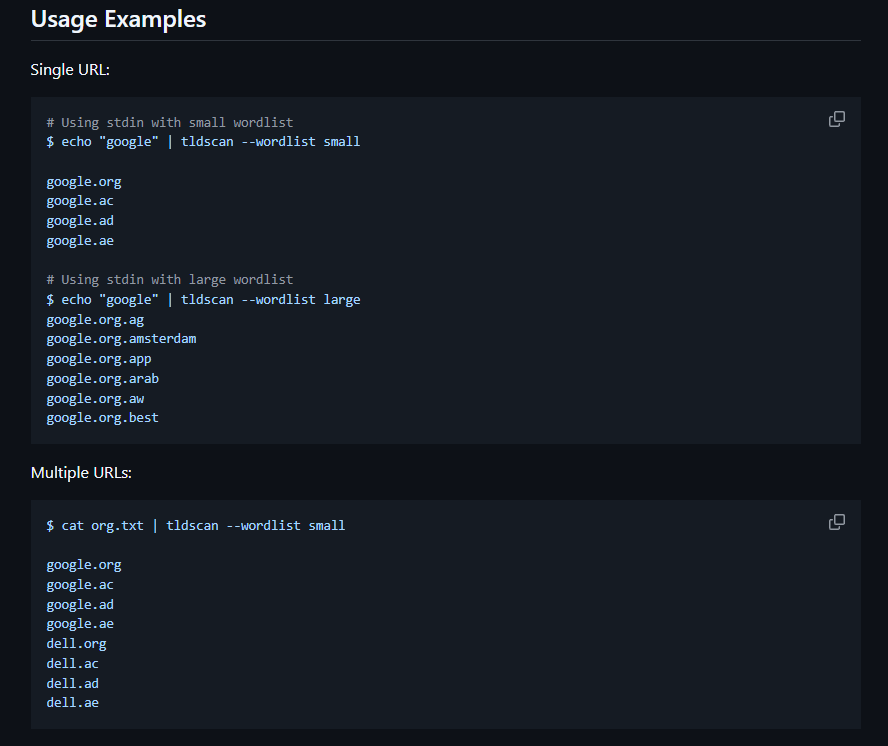
| # Fast scan with standard TLDs
echo "google" | tldscan -w small
# Output: google.org, google.com, google.net, etc.
# Comprehensive scan with TLD combinations
echo "google" | tldscan -w large
# Output: google.co.uk, google.com.br, google.org.in, etc.
|
Multiple Domains:
1
2
3
4
5
6
7
| # Scan multiple organizations from file
cat organizations.txt | tldscan -w small -o results.txt
# Example organizations.txt:
# google
# microsoft
# apple
|
Verbose Output:
1
2
3
4
5
| # See IP addresses and setup information
echo "google" | tldscan -w large -v
# Output:
# google.co.uk -> 142.250.185.3
# google.com.br -> 172.217.29.163
|
Silent Mode for Automation:
1
2
| # Clean output for scripting
echo "target" | tldscan --silent -o active_domains.txt
|
Command Line Options
| Flag | Short | Description | Default |
|---|
--concurrency | -c | Number of concurrent workers | 50 |
--org | | Organization name to scan | |
--wordlist | -w | Wordlist type: small or large | small |
--output | -o | Save results to file | |
--verbose | -v | Show IP addresses and debug info | false |
--silent | | Suppress banner and non-essential output | false |
--version | | Show version and exit | false |
Usage Examples
Bug Bounty & Security Research
1
2
3
4
5
| # Discover all active TLDs for a target
echo "target-company" | tldscan -w large -v -o targets.txt
# High-speed scanning with custom concurrency
cat bugbounty-targets.txt | tldscan -c 100 --silent > active_domains.txt
|
Corporate Asset Discovery
1
2
3
4
5
| # Find all registered domains for your organization
tldscan --org yourcompany -w large -o company_assets.txt
# Monitor for new domain registrations regularly
echo "yourbrand" | tldscan -w small > current_domains.txt
|
1
2
3
4
5
| # Pipe results to httpx for HTTP probing
echo "target" | tldscan -w small | httpx -silent
# Combine with subfinder for comprehensive reconnaissance
subfinder -d target.com | tldscan -w small | httpx -status-code
|
How It Works
- Wordlist Management: Automatically downloads and caches TLD lists from IANA
- Domain Generation: Combines input domains with TLD combinations
- DNS Resolution: Concurrently resolves domains to find active ones
- Result Filtering: Outputs only domains with valid DNS records
- Use
-c 100 or higher on fast connections for better performance --wordlist small is recommended for initial reconnaissance--wordlist large provides comprehensive coverage but is slower- Combine with
--silent when piping to other tools
Contributing
Contributions are welcome! Please feel free to submit pull requests or open issues for bugs and feature requests.
License
This project is licensed under the MIT License - see the LICENSE file for details.
Acknowledgments
- TLD data sourced from IANA Root Zone Database
- Inspired by the need for comprehensive domain discovery in security research
Note: Use this tool responsibly and only on domains you own or have permission to test. Always comply with applicable laws and terms of service.